Query Plan Architecture: Pattern for Apex Triggers
Learn how to structure complex Salesforce triggers with the Query Plan Architecture pattern. Separate logic into 4 phases (Collect, Load, Run, Commit) to eliminate duplicate SOQL, respect governor limits, and simplify testing.
View the complete source code on GitHub: salesforce-query-plan-architecture
What is this pattern?
Query Plan Architecture is a design pattern for structuring the internal logic of any Trigger Handler in Salesforce Apex. It applies to any SObject and any trigger event (beforeInsert, beforeUpdate, afterInsert, afterUpdate, etc.).
Its goal is to solve the classic problem of complex triggers: multiple features each making their own independent SOQL queries, generating hard-to-maintain code, duplicate queries, and the risk of exceeding governor limits.
The pattern divides the execution of each “feature” into 4 clearly differentiated phases, applying the principle of separation of concerns:
| Phase | Responsible | What it does |
|---|---|---|
| 1. COLLECT | TriggerFeature.collect() | Declares what data it needs (without making queries) |
| 2. LOAD | TriggerDataset.load() | Executes all SOQL queries in a single pass |
| 3. RUN | TriggerFeature.run() | Executes business logic using already-loaded data |
| 4. COMMIT | fflib_ISObjectUnitOfWork | Persists all DML changes (only in AFTER events) |
Important note about BEFORE vs AFTER:
- In BEFORE events (
beforeInsert,beforeUpdate): the COLLECT, LOAD, and RUN phases apply equally. The COMMIT phase does not apply because records don’t have an ID yet and Salesforce manages persistence at the end of the before context.- In AFTER events (
afterInsert,afterUpdate): all phases apply, including COMMIT withuow.commitWork().
Pattern components
Each SObject implementing this pattern will have its own set of classes with the object prefix. The examples use Lead as a reference, but the pattern is identical for any other object.
1. [Object]Context
Encapsulates trigger data (Trigger.new, Trigger.oldMap, operation) and provides typed accessors and business helpers without executing any SOQL query.
// Generic example
public class LeadContext extends BaseTriggerContext {
    public LeadContext(List<Lead> newList, Map<Id, Lead> oldMap, TriggerOperation op) {
        super(newList, oldMap, op);
    }
    public List<Lead> getLeads() { return (List<Lead>) this.newList; }
    public Lead getOldLead(Id id) { return (Lead) this.oldMap?.get(id); }
    // Object-specific business helpers...
    public Boolean statusChanged(Lead newLead, Lead oldLead) { ... }
}
Responsibilities:
- Provide typed access to
Trigger.newandTrigger.oldMap - Expose the trigger operation (
BEFORE_INSERT,AFTER_UPDATE, etc.) - Contain reusable business helpers across Features
- Never make SOQL queries
Note about
BaseTriggerContext: By extending this base class, the Context already handles the internal casting ofTrigger.newandTrigger.oldMapto the correct type. This prevents each Feature from having to do its own manual casting, reducing errors and repetitive code. The typed methods (getLeads(),getOldLead()) are simple wrappers over data already cast in the constructor.
2. [Object]QueryPlan
Acts as an accumulator configuration object (“shopping list”). Features populate it during the COLLECT phase to declare what data they’ll need in the RUN phase. It executes no queries.
// Generic example
public class LeadQueryPlan {
    public Boolean needDelegadoComercialUsers { get; set; }
    public Set<Id> delegationIdsForDelegadoComercial { get; private set; }

    public LeadQueryPlan() {
        this.needDelegadoComercialUsers = false;
        this.delegationIdsForDelegadoComercial = new Set<Id>();
    }

    // Fluent method: allows chaining and accumulates IDs from multiple features
    public LeadQueryPlan requireDelegadoComercialUsers(Set<Id> ids) {
        this.needDelegadoComercialUsers = true;
        if (ids != null) { this.delegationIdsForDelegadoComercial.addAll(ids); }
        return this;
    }

    // Debug utility
    public String getSummary() { ... }
}
Responsibilities:
- Accumulate IDs and flags from all Features in a single pass
- Avoid duplicate queries (if 5 Features need the same data, the plan only loads it once)
- Never make SOQL queries
3. [Object]Dataset
This is the ONLY class that executes SOQL queries within the trigger context. It receives the already-populated QueryPlan, executes the minimum necessary queries, and caches the results for the rest of the transaction.
// Generic example
public inherited sharing class LeadDataset {
    public Map<Id, Set<Id>> delegadoComercialUsersByDelegationId { get; private set; }

    public LeadDataset() {
        this.delegadoComercialUsersByDelegationId = new Map<Id, Set<Id>>();
    }

    // Single entry point for data loading
    public void load(LeadQueryPlan plan) {
        if (plan == null) { return; }
        loadDelegadoComercialUsers(plan);
    }

    private void loadDelegadoComercialUsers(LeadQueryPlan plan) {
        if (!plan.needDelegadoComercialUsers || plan.delegationIdsForDelegadoComercial.isEmpty()) {
            return;
        }
        IDelegationUsersSelector selector =
            (IDelegationUsersSelector) Application.Selector.newInstance(DelegationUser__c.SObjectType);
        this.delegadoComercialUsersByDelegationId.putAll(
            selector.selectDelegadoComercialUserIdsByDelegationIds(plan.delegationIdsForDelegadoComercial)
        );
    }

    public Set<Id> getDelegadoComercialUsers(Id delegationId) {
        return this.delegadoComercialUsersByDelegationId.containsKey(delegationId)
            ? this.delegadoComercialUsersByDelegationId.get(delegationId)
            : new Set<Id>();
    }
}
Responsibilities:
- Be the only SOQL executor in the trigger context
- Load data only if any Feature needed it (evaluating QueryPlan flags)
- Consolidate IDs from multiple features into a single query
4. [Object]Feature (abstract base class)
Base class for all trigger functionalities. Defines the contract they must fulfill:
public abstract class LeadFeature {

    // Optional: Declares what data it needs. Do not make SOQL here.
    public virtual void collect(LeadQueryPlan plan, LeadContext ctx) { }

    // Required: Executes the business logic
    public abstract void run(LeadContext ctx, LeadDataset dataset, fflib_ISObjectUnitOfWork uow);

    public String getName() {
        return String.valueOf(this).split(':')[0];
    }
}collect()is optional (empty virtual). Only override if the Feature needs to load external data.run()is required (abstract). All business logic goes here.- In BEFORE events, the
uowparameter will arrive asnull.
Complete execution flow
Visual data flow diagram
The following diagram shows how data flows horizontally across all features during COLLECT, consolidates in a single vertical pass to the database during LOAD, and then distributes back in memory during RUN:
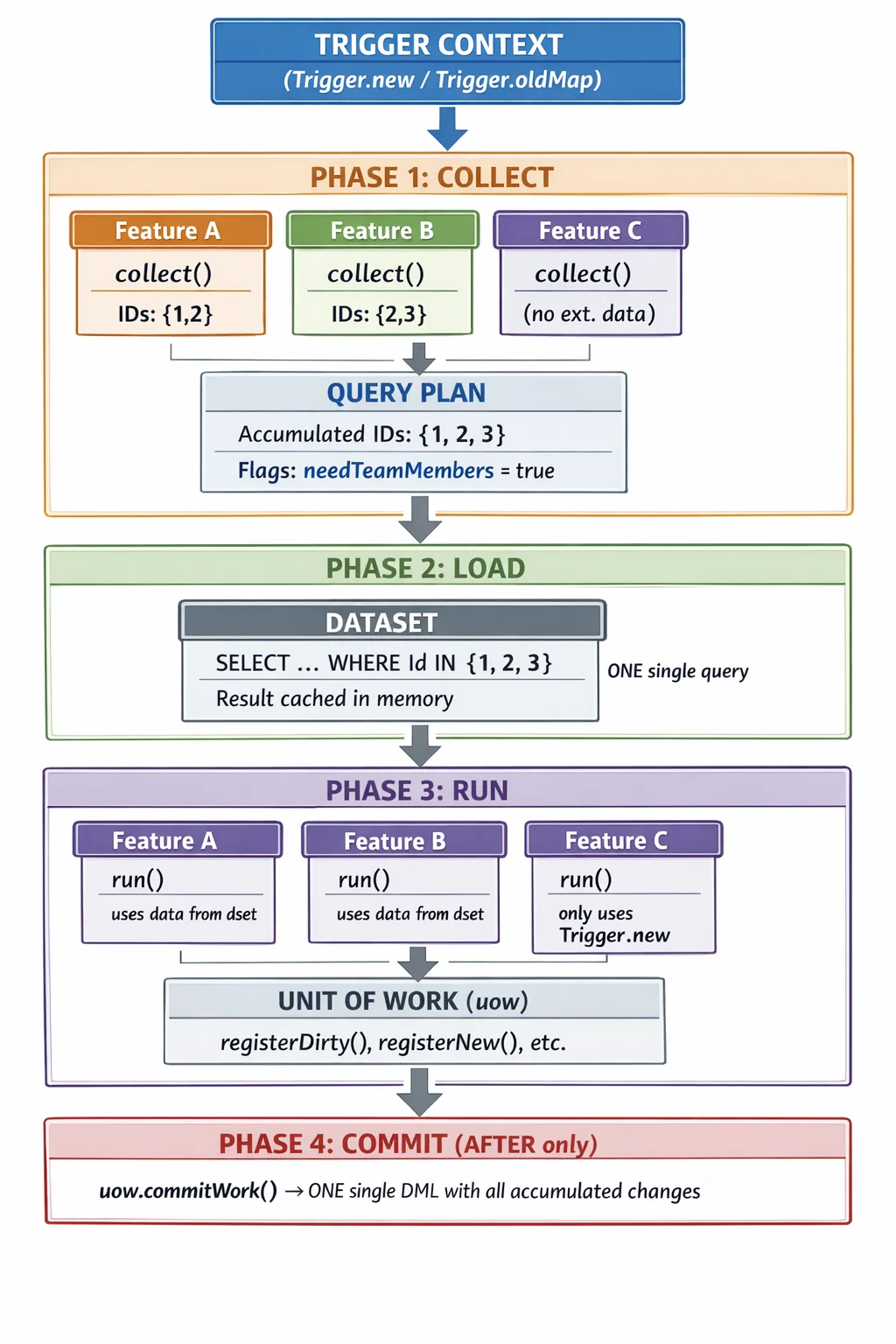
Key points from the diagram:
- Features declare data needs in parallel during COLLECT, without executing queries.
- The QueryPlan deduplicates IDs automatically (2 + 3 = 3).
- The Dataset makes one single query to the database with all consolidated IDs.
- During RUN, all features access the same data in memory (no additional queries).
- Feature C doesn’t need external data — it doesn’t participate in COLLECT, but it does in RUN.
AFTER event (with COMMIT)
TriggerHandler.afterUpdate() / afterInsert()
    └── executeFeatures(ctx, features)
            ├── [COLLECT] feature1.collect(plan, ctx)   ← no SOQL
            ├── [COLLECT] feature2.collect(plan, ctx)   ← no SOQL
            ├── [LOAD] dataset.load(plan)               ← ONE SINGLE SOQL pass
            ├── [RUN] feature1.run(ctx, dataset, uow)   ← data already in memory
            ├── [RUN] feature2.run(ctx, dataset, uow)   ← data already in memory
            └── [COMMIT] uow.commitWork()               ← transactional DML
BEFORE event (no COMMIT)
TriggerHandler.beforeInsert() / beforeUpdate()
    └── executeFeatures(ctx, features)
            ├── [COLLECT] feature1.collect(plan, ctx)   ← no SOQL
            ├── [COLLECT] feature2.collect(plan, ctx)   ← no SOQL
            ├── [LOAD] dataset.load(plan)               ← SOQL queries
            ├── [RUN] feature1.run(ctx, dataset, null)  ← uow = null
            └── [RUN] feature2.run(ctx, dataset, null)  ← modify records directly
Beware of
beforeInsert: In this event,Trigger.newrecords have no ID (Idisnull). If your feature tries to accumulate IDs from the incoming records themselves into the QueryPlan (e.g.,plan.requireRelatedData(newRecord.Id)), these will benulland the query will return no results. InbeforeInsert, the QueryPlan should only accumulate IDs from relational fields that already have a value (such asAccountId,OwnerId, or lookup fields that come pre-populated). This is a classic mistake that a new developer will make when using the framework.
TriggerHandler orchestrator implementation
public class LeadTriggerHandler extends TriggerHandler {

    public override void afterUpdate() {
        executeFeatures(
            new LeadContext((List<Lead>) Trigger.new, (Map<Id, Lead>) Trigger.oldMap, TriggerOperation.AFTER_UPDATE),
            getAfterUpdateFeatures()
        );
    }

    public override void beforeInsert() {
        executeFeatures(
            new LeadContext((List<Lead>) Trigger.new, null, TriggerOperation.BEFORE_INSERT),
            getBeforeInsertFeatures()
        );
    }

    private List<LeadFeature> getAfterUpdateFeatures() {
        return new List<LeadFeature>{ new PromoNameNotificationFeature() };
    }

    private List<LeadFeature> getBeforeInsertFeatures() {
        return new List<LeadFeature>{ };
    }

    private void executeFeatures(LeadContext ctx, List<LeadFeature> features) {
        LeadQueryPlan plan = new LeadQueryPlan();
        LeadDataset dataset = new LeadDataset();

        for (LeadFeature feature : features) { feature.collect(plan, ctx); }

        dataset.load(plan);

        Boolean isAfterEvent = ctx.operationType == TriggerOperation.AFTER_UPDATE
                            || ctx.operationType == TriggerOperation.AFTER_INSERT
                            || ctx.operationType == TriggerOperation.AFTER_DELETE;
        fflib_ISObjectUnitOfWork uow = isAfterEvent ? Application.UnitOfWork.newInstance() : null;

        for (LeadFeature feature : features) {
            try {
                feature.run(ctx, dataset, uow);
            } catch (Exception e) {
                Logger.error(new LogMessage('Error in feature {0}: {1}', feature.getName(), e.getMessage()))
                    .setExceptionDetails(e).addTags(LOGGER_TAGS);
            }
        }

        if (uow != null) {
            try { uow.commitWork(); }
            catch (Exception ex) { Logger.error('Error in commitWork').setExceptionDetails(ex).addTags(LOGGER_TAGS); }
        }
    }
}
Practical example: ClosedWonFollowUpFeature
This example uses Opportunity to show that the pattern works for any SObject. The feature creates a follow-up Task for each account team member (AccountTeamMember) when an opportunity moves to “Closed Won” stage.
This use case clearly illustrates the value of the QueryPlan: if 50 opportunities from 5 different accounts are updated in the same trigger, the pattern guarantees that only one query is executed to load all AccountTeamMember records, instead of up to 50 individual queries.
Real impact on Governor Limits
Scenario: 200 Opportunities updated to “Closed Won”, belonging to 15 different Accounts. Two features need to query
AccountTeamMember.
| Metric | Without Query Plan | With Query Plan | Difference |
|---|---|---|---|
| SOQL queries executed | 400 (200 × 2 features) | 1 | -99.75% |
| Records queried | Duplicated in each feature | Single shared load | No duplicates |
| Exceeds 100 SOQL limit? | Yes — System.LimitException | No — uses 1 of 100 | Safe transaction |
| DML statements | Scattered across each feature | 1 (uow.commitWork()) | Atomic and consolidated |
Result: from 400 queries that break the transaction to 1 single query consuming 1% of the governor limit. This is the pattern’s core value — and it scales linearly: more features sharing data = greater savings.
Full class
public class ClosedWonFollowUpFeature extends OpportunityFeature {

    // Internal state between collect() and run()
    private List<Opportunity> closedOpportunities = new List<Opportunity>();

    // COLLECT PHASE: identifies which opportunities just closed
    // and declares which AccountIds the Dataset will need to load
    public override void collect(OpportunityQueryPlan plan, OpportunityContext ctx) {
        for (Opportunity newOpp : ctx.getOpportunities()) {
            Opportunity oldOpp = ctx.getOldOpportunity(newOpp.Id);
            if (justClosedWon(newOpp, oldOpp)) {
                closedOpportunities.add(newOpp);
                plan.requireAccountTeamMembers(newOpp.AccountId);
            }
        }
    }

    // RUN PHASE: uses data already loaded in memory to create the tasks
    public override void run(OpportunityContext ctx, OpportunityDataset dataset, fflib_ISObjectUnitOfWork uow) {
        for (Opportunity opp : closedOpportunities) {
            List<AccountTeamMember> teamMembers = dataset.getAccountTeamMembers(opp.AccountId);
            for (AccountTeamMember member : teamMembers) {
                uow.registerNew(new Task(
                    Subject      = 'Post-close follow-up: ' + opp.Name,
                    OwnerId      = member.UserId,
                    WhatId       = opp.Id,
                    ActivityDate = Date.today().addDays(7),
                    Priority     = 'Normal',
                    Status       = 'Not Started'
                ));
            }
        }
    }

    private Boolean justClosedWon(Opportunity newOpp, Opportunity oldOpp) {
        return newOpp.StageName == 'Closed Won'
            && (oldOpp == null || oldOpp.StageName != 'Closed Won');
    }
}
OpportunityQueryPlan and OpportunityDataset for the example
To understand the full “magic”, here are the supporting classes for this example:
// OpportunityQueryPlan: accumulates needs from ALL features
public class OpportunityQueryPlan {
    public Boolean needAccountTeamMembers { get; set; }
    public Set<Id> accountIdsForTeamMembers { get; private set; }

    public OpportunityQueryPlan() {
        this.needAccountTeamMembers = false;
        this.accountIdsForTeamMembers = new Set<Id>();
    }

    // If 3 different features call this method with different IDs,
    // ALL are accumulated in a single Set → one single query
    public OpportunityQueryPlan requireAccountTeamMembers(Id accountId) {
        this.needAccountTeamMembers = true;
        if (accountId != null) { this.accountIdsForTeamMembers.add(accountId); }
        return this;
    }
}
// OpportunityDataset: executes ONE single query with ALL accumulated IDs
public inherited sharing class OpportunityDataset {
private Map<Id, List<AccountTeamMember>> teamMembersByAccountId;
public OpportunityDataset() {
this.teamMembersByAccountId = new Map<Id, List<AccountTeamMember>>();
}
public void load(OpportunityQueryPlan plan) {
if (plan == null) { return; }
loadAccountTeamMembers(plan);
}
private void loadAccountTeamMembers(OpportunityQueryPlan plan) {
if (!plan.needAccountTeamMembers || plan.accountIdsForTeamMembers.isEmpty()) {
return;
}
// ONE SINGLE QUERY for all AccountIds from all features
for (AccountTeamMember atm : [
SELECT Id, UserId, AccountId, TeamMemberRole
FROM AccountTeamMember
WHERE AccountId IN :plan.accountIdsForTeamMembers
]) {
if (!this.teamMembersByAccountId.containsKey(atm.AccountId)) {
this.teamMembersByAccountId.put(atm.AccountId, new List<AccountTeamMember>());
}
this.teamMembersByAccountId.get(atm.AccountId).add(atm);
}
}
public List<AccountTeamMember> getAccountTeamMembers(Id accountId) {
return this.teamMembersByAccountId.containsKey(accountId)
? this.teamMembersByAccountId.get(accountId)
: new List<AccountTeamMember>();
}
}Why does this example illustrate the pattern well?
- COLLECT makes no SOQL: it only examines trigger records and accumulates
AccountIds into the plan. - LOAD consolidates queries: if 50 opportunities belong to 5 accounts, the
DatasetrunsSELECT ... WHERE AccountId IN (5 IDs)exactly once. - RUN works in memory: uses
dataset.getAccountTeamMembers(id)without touching the database. - COMMIT is transactional: all
Taskrecords are inserted together in a single DML at the end.
How to add a new Feature
Isn’t this too much boilerplate? It depends on the type of feature. If your new feature doesn’t need external data (only operates on
Trigger.new), you don’t touch QueryPlan or Dataset at all — just create the Feature class and register it in the Handler (steps 1 and 2). Step 3 only applies when you need to load additional data. Yes, there are more classes than in a monolithic handler. But each class has a single responsibility, is testable in isolation, and a new developer can understand what a Feature does by reading just its class, without navigating 500 lines of a giant Handler.
Step 1: Create the class
public class MyNewFeature extends LeadFeature {

    public override void collect(LeadQueryPlan plan, LeadContext ctx) {
        Set<Id> ids = new Set<Id>();
        for (Lead lead : ctx.getLeads()) {
            if (myCondition(lead, ctx.getOldLead(lead.Id))) { ids.add(lead.AssignedDelegation__c); }
        }
        if (!ids.isEmpty()) { plan.requireDelegadoComercialUsers(ids); }
    }

    public override void run(LeadContext ctx, LeadDataset dataset, fflib_ISObjectUnitOfWork uow) {
        for (Lead lead : ctx.getLeads()) {
            // If AFTER: uow.registerDirty(...)
            // If BEFORE: lead.MyField__c = value;
        }
    }
}
Step 2: Register in the TriggerHandler
private List<LeadFeature> getAfterUpdateFeatures() {
    return new List<LeadFeature>{
        new PromoNameNotificationFeature(),
        new MyNewFeature() // Add here
    };
}
Step 3: Extend QueryPlan and Dataset (if you need new data)
In [Object]QueryPlan:
public Boolean needMyData { get; set; }
public Set<Id> idsForMyData { get; private set; }

public LeadQueryPlan requireMyData(Set<Id> ids) {
    this.needMyData = true;
    if (ids != null) { this.idsForMyData.addAll(ids); }
    return this;
}
In [Object]Dataset:
private void loadMyData(LeadQueryPlan plan) {
    if (!plan.needMyData || plan.idsForMyData.isEmpty()) { return; }
    IMyObjectSelector selector = (IMyObjectSelector) Application.Selector.newInstance(MyObject__c.SObjectType);
    for (MyObject__c obj : selector.selectByIds(plan.idsForMyData)) {
        this.myData.put(obj.Id, obj);
    }
}
Pattern benefits
| Previous problem | Solution with Query Plan |
|---|---|
| Each feature made its own SOQL | A single load point (Dataset) |
| Duplicate SOQL between features | ID accumulation → a single query |
| Logic intermixed with queries | Clear separation by phases |
| Hard to test in isolation | Each Feature testable with Context and Dataset mocks |
| DML scattered throughout the trigger | A single uow.commitWork() at the end |
| Monolithic trigger hard to extend | Adding Feature = creating a class, without touching existing code |
Scaling considerations
What if I have 50 features on a single object?
If an SObject like Account has 50 different business processes, the QueryPlan could grow to dozens of flags and require methods. This is a sign that the object has too much accumulated responsibility. Before worrying about QueryPlan size, evaluate:
- Do all features belong in the trigger? Often, logic in a trigger should be a Platform Event, a Flow, or a Queueable. Migrate non-critical logic out of the synchronous context.
- Group by functional domain: If the QueryPlan grows too large, you can group related data using inner classes or composition:
plan.billing().requireInvoices(ids),plan.team().requireMembers(ids). Each group encapsulates its own set of flags. - In practice, most SObjects have between 5 and 15 features per trigger event. The QueryPlan remains readable and manageable at that scale.
Heap Size consumption
The Dataset maintains a single copy of data in memory, shared across all Features. This is more efficient than the pattern-less approach where each feature stores its own copy of the result.
However, keep these limits in mind for bulk transactions (200 records):
- Heap Size: 6 MB in synchronous context, 12 MB in asynchronous.
- Mitigations: limit fields in the Selector’s SELECT (only necessary ones), use queries with LIMIT if the use case allows, and in extreme cases consider
Database.executeBatchfor chunk processing. - Rule of thumb: the worst-case heap with this pattern is equal to or less than without it, because query consolidation eliminates duplicate data in memory.
Query Plan vs fflib Selector Layer
If you already use fflib, you’re probably wondering: “Doesn’t the Selector Layer solve this?” The answer is that Query Plan doesn’t replace Selectors — it orchestrates them.
| Aspect | fflib Selector Layer | Query Plan Architecture |
|---|---|---|
| Who decides what to load | Each consumer calls the Selector when it wants | Features declare needs; the Dataset loads everything together |
| Query timing | Scattered (each Service or Domain calls on its own) | Consolidated (a single LOAD phase before executing logic) |
| ID deduplication | Not automatic (if 3 services request the same IDs, that’s 3 queries) | Automatic (the QueryPlan accumulates unique IDs in a Set) |
| Scope | Generic for the entire application | Specific to the Trigger context |
| Who executes the query | The Selector directly | The Dataset calls the Selector internally |
The key takeaway: fflib Selectors tell you HOW to make the query (which fields, which filters, which order). The QueryPlan tells you WHEN and WITH WHAT data to make it, consolidating multiple consumers into a single execution. In fact, if you look at the Dataset code, you’ll see that internally it uses fflib Selectors:
// The Dataset USES the fflib Selector — it doesn't replace it
IDelegationUsersSelector selector =
    (IDelegationUsersSelector) Application.Selector.newInstance(DelegationUser__c.SObjectType);
File structure
force-app/main/default/classes/[Object]/
├── Context/
│   ├── [Object]Context.cls
│   └── [Object]ContextTest.cls
├── QueryPlan/
│   ├── [Object]QueryPlan.cls
│   └── [Object]QueryPlanTest.cls
├── Dataset/
│   └── [Object]Dataset.cls
├── Feature/
│   ├── [Object]Feature.cls
│   ├── MyFeature1.cls
│   └── MyFeature1Test.cls
└── TriggerHandler/
    └── [Object]TriggerHandler.cls
Pattern rules (mandatory)
- SOQL only in
[Object]Dataset— No Feature, Context, or TriggerHandler can make direct queries. - DML only via UnitOfWork — In AFTER events, register in
uow. Never direct DML in Features. collect()is read-only — Only declares needs to the plan, does not modify records or make SOQL.- Feature internal state — If a Feature stores state between
collect()andrun(), it must be a private instance field. - Do not use
Trigger.newdirectly in Features — Always usectx.getLeads()or the typed equivalent. - One Feature = one responsibility — If a Feature needs to do more than one thing, split it into two.
- In BEFORE events,
uowis null — Check ifuow != nullbefore using it, or modify records directly in the context.
Theoretical foundations
This architecture does not emerge from nothing. It is a deliberate composition of four well-established patterns, each solving a different dimension of the problem.
1. Template Method — The lifecycle skeleton
Source: Design Patterns: Elements of Reusable Object-Oriented Software — Gang of Four (1994).
Original purpose: Define the skeleton of an algorithm in an abstract class, delegating concrete steps to subclasses, without allowing them to alter the general structure of the algorithm.
How it’s applied here:
The abstract [Object]Feature class defines the mandatory lifecycle of any trigger functionality: first collect(), then run(). This order is controlled by the orchestrator (executeFeatures), not by each Feature. Concrete subclasses only implement the specific steps, without being able to skip or reorder the phases.
[Object]Feature (abstract)
├── collect()  → optional hook (empty virtual by default)
└── run()      → required hook (abstract, no implementation)

PromoNameNotificationFeature (concrete)
├── collect()  → declares which delegations it needs
└── run()      → sends notifications using pre-loaded data
Without this pattern, each developer could invent their own convention for structuring a feature, breaking the framework’s consistency.
2. Strategy — Feature interchangeability
Source: Design Patterns: Elements of Reusable Object-Oriented Software — Gang of Four (1994).
Original purpose: Define a family of algorithms, encapsulate each one in a separate class, and make them interchangeable without modifying the client code that uses them.
How it’s applied here:
The TriggerHandler contains no rigid business logic. Instead, it delegates to a list of Features selectable by event. Each event has its own list of active “strategies” (getAfterUpdateFeatures(), getBeforeInsertFeatures(), etc.).
// The TriggerHandler only iterates over the common interface
for (LeadFeature feature : features) {
    feature.collect(plan, ctx); // doesn't know what each concrete feature does
}
This allows adding, removing, or replacing a Feature without touching anything in the orchestrator. Extensibility is its main contribution: new functionality = new class, without modifying existing code (Open/Closed principle).
3. DataLoader — QueryPlan efficiency
Source: Facebook Engineering, 2010. Published as an open source library in 2015.
Original purpose: Solve the N+1 query problem in applications with multiple independent data consumers. Instead of each consumer making its own query, DataLoader accumulates all requested keys in a single “tick” and resolves them in a single backend call (batching).
The N+1 problem it solves:
// WITHOUT DataLoader: N consumers = N queries
feature1 → SELECT ... WHERE DelegationId__c = 'a'
feature2 → SELECT ... WHERE DelegationId__c = 'b'
feature3 → SELECT ... WHERE DelegationId__c = 'a'  ← duplicate!

// WITH DataLoader (QueryPlan): N consumers = 1 query
collect()  → plan accumulates {'a', 'b'} from all 3 features
load()     → SELECT ... WHERE DelegationId__c IN ('a', 'b')
Mapped to the framework:
| DataLoader (JavaScript) | Query Plan Architecture (Apex) |
|---|---|
dataloader.load(key) | plan.requireXYZ(ids) in collect() |
| Accumulation in the event loop | Accumulation in the COLLECT phase |
batchLoadFn(keys[]) | dataset.load(plan) |
dataloader.get(key) | dataset.getXYZ(id) in run() |
| Per-request cache | In-memory Dataset per transaction |
This is the most critical pattern in the architecture. It is the reason for the QueryPlan and Dataset to exist: separating the moment when the need is declared from the moment it is resolved, allowing automatic consolidation across all Features.
4. Unit of Work — DML consolidation
Source: Patterns of Enterprise Application Architecture — Martin Fowler, 2002. Salesforce implementation: fflib-apex-common (Apex Enterprise Patterns).
Original purpose: Maintain a record of all objects affected by a business transaction and coordinate the writing of changes at the end, instead of making database operations scattered throughout the transaction.
How it’s applied here:
During the RUN phase, no Feature executes DML directly. Instead, it registers operations in the UnitOfWork:
// Feature registers, does not execute
uow.registerDirty(lead);              // pending UPDATE
uow.registerNew(event);               // pending INSERT
uow.registerPublishAfterSuccessTransaction(platformEvent); // pending PUBLISH

// Only at the end of executeFeatures, everything is materialized:
uow.commitWork(); // ONE single DML with all accumulated changes
This ensures that the entire transaction is atomic: either everything is persisted correctly or nothing is persisted. It also minimizes the number of DML operations consumed from Salesforce’s governor limits.
Unit of Work complements the DataLoader pattern: DataLoader consolidates reads (SOQL), Unit of Work consolidates writes (DML). Together, they guarantee the minimum possible governor limit consumption throughout the entire execution.
Pattern-to-component mapping
| Pattern | Component in the framework | What it solves |
|---|---|---|
| Template Method | [Object]Feature (abstract) | Uniform lifecycle for all Features |
| Strategy | get[Event]Features() lists | Extensibility without modifying the orchestrator |
| DataLoader | [Object]QueryPlan + [Object]Dataset | SOQL consolidation across multiple Features |
| Unit of Work | fflib_ISObjectUnitOfWork in executeFeatures | DML consolidation in a single transaction |
Related Articles
 Salesforce
 Bulk DML Service Pattern: Partial DML Operations in Salesforce
Complete technical documentation of the Bulk DML Service Pattern framework for Salesforce. Learn to perform resilient DML operations with partial success using a familiar Unit of Work-style API.
 Salesforce
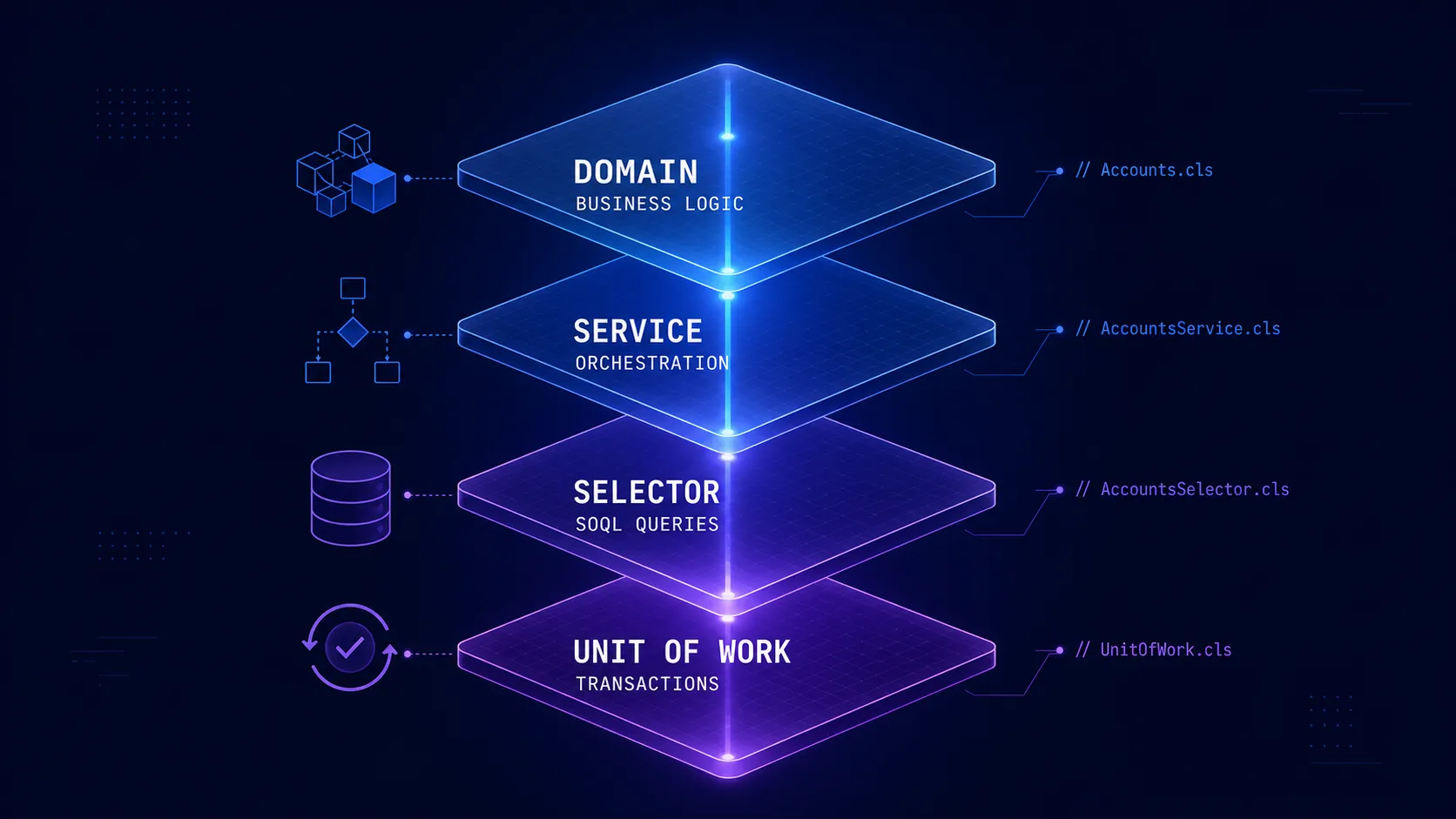
 Salesforce Architecture with FFLib: Enterprise Patterns
Complete guide on implementing enterprise architectural patterns in Salesforce using FFLib. Includes Domain Layer, Selector Layer, Service Layer, and Unit of Work.
 Salesforce Featured
 CI/CD for Salesforce: Deployment Automation
Complete implementation of CI/CD pipelines for Salesforce using GitHub Actions, SFDX CLI, and Scratch Orgs. Includes best practices and troubleshooting.